
Retirement Living takes an unbiased approach to our reviews. We may earn money when you click a partner link. Learn More
Best Medical Alert Systems That Call Family in 2026
We tested and selected the best medical alert systems that notify your family quickly and reliably during emergencies.
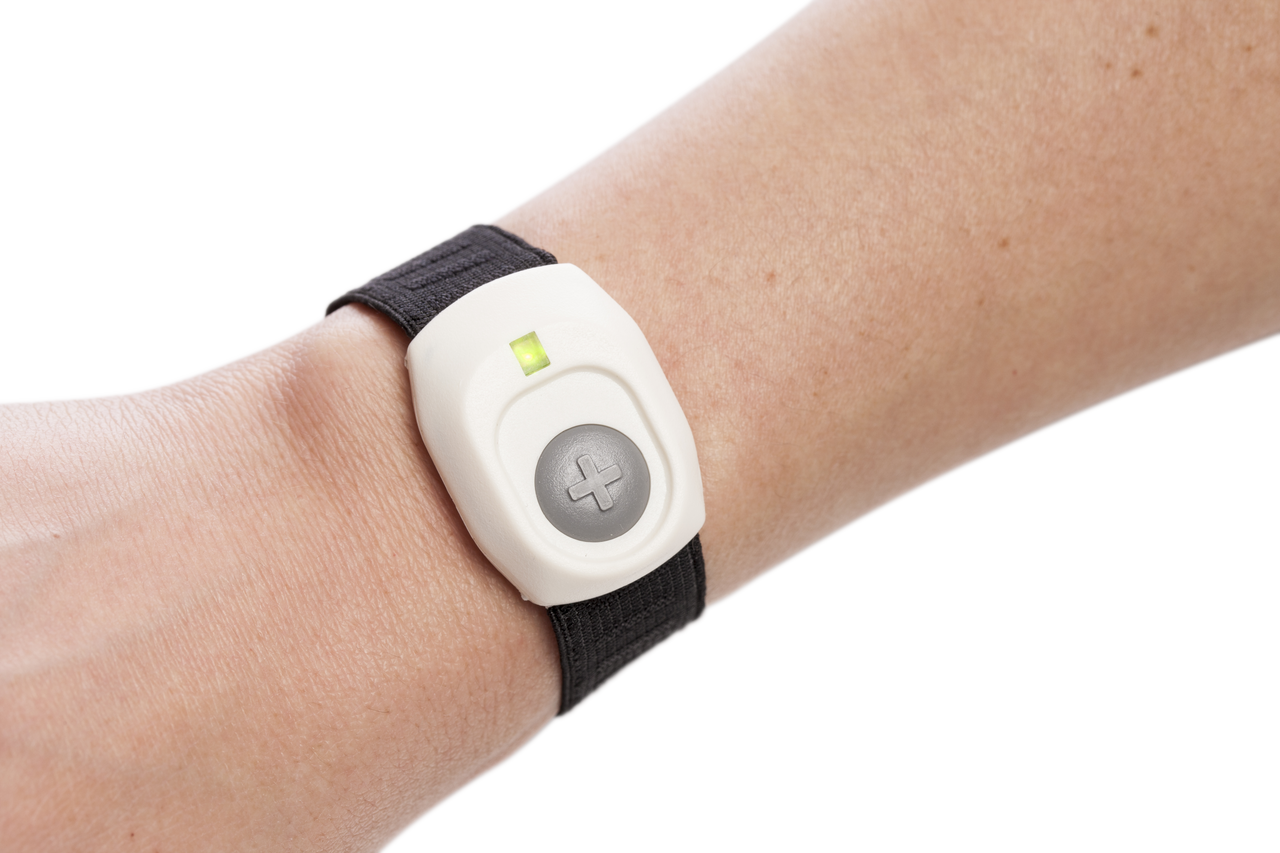


Updated:
Our top picks for medical alert systems that call family include Medical Guardian and Lively.
4.7
Medical Guardian’s tagline, “Life Without Limits,” shows its mission. The company aims to help customers live independently. Medical Guardian provides five in-home or mobile systems. They also have a medical alert smartwatch and the MGMini wearable alert button.
- Great variety
- Call chain for caregivers
- Sleek, stylish wearable devices

4.5
Lively works on Apple Watches, Amazon Alexa devices, and Jitterbug cell phones. You need an active subscription plan to use it. Their wearable Mobile2 button is a waterproof medical alert device that includes enhanced GPS and optional fall detection. It is FSA-, HSA-, and HRA-eligible.
- Great for tech-savvy seniors
- Nurse on-call
- Compatible with Alexa and Apple Watch
ADT’s Medical Alert and On-the-Go systems are in-home and portable medical alert systems that cost around $1 per day. Your bill will never increase unless you upgrade medical alert services with ADT’s ForeveRate™ guarantee.
- Great plans
- Home temperature monitoring
- Fixed-rate service
Bay Alarm Medical is a medical alert system that offers 24/7 monitoring and trained professionals to assist during urgent situations. Bay Alarm, the parent company, has been protecting its clients for almost 80 years.
- Great customer service
- Vial of Life included with purchase
- Free spouse monitoring
A medical alert that calls family helps older adults get assistance during emergencies. Depending on the device and service, pressing a help button connects the user to a 24/7 monitoring center that can contact designated family members.
We compared family notification methods, caregiver features, location tracking, and costs to select our top picks. See our methodology to learn how we evaluated these systems.
For a comparison of medical alert systems across different needs and features, see our full guide to the best medical alert systems.
Medical Alert Systems That Call Family: Comparison Table
| Provider | Starting monthly cost | How family is notified | Caregiver app and location | Fall detection |
|---|---|---|---|---|
| Medical Guardian | $27.95 for MGHome Landline with annual billing | Monitoring center follows the user’s emergency response plan | MyGuardian app and portal; location features on supported mobile devices | Optional; $10/mo. on compatible devices |
| Lively | $24.99/mo. for Basic, plus device cost | Lively Link sends family alerts when the user contacts Urgent Response | Lively Link app provides GPS location, recent activity, and battery information | Optional; $9.99/mo. |
| ADT Medical Alert | $31.99/mo., plus activation fee | Monitoring center contacts designated family members according to the response plan | No dedicated caregiver app for routine device updates or location checks | Optional on compatible plans; $11/mo. |
| Bay Alarm Medical | $27.95/mo. for SOS Home Landline; mobile plans start at $34.95/mo. | Professional monitoring responds to emergencies and can contact designated contacts | Caregiver app offers location tracking, location history, and low-battery alerts on supported mobile devices | Optional; generally $10/mo. on compatible devices |
Medical Alert Systems That Call Family Reviews
Medical Guardian Review
Great variety
|
Medical Guardian offers in-home and mobile medical alert systems for older adults who want emergency support and family caregiver access. Its devices include the MGHome Landline, MGHome Cellular, MGMini, MGMini Lite, MGMove smartwatch, and Guardian Flex.
Family and Caregiver Features
- Emergency contacts: Users can designate family members and customize their contact order.
- MyGuardian app and portal: Caregivers can access device information and manage emergency contacts.
- Location tracking: Supported mobile devices provide location information and location history.
- Device status: Caregivers can check battery levels, connection status, and alert history.
Pricing
Medical Guardian’s plans start at $27.95 per month for MGHome Landline, $39.95 for MGMini and $44.95 for MGMove with annual billing. Equipment fees may apply, and optional fall detection costs an additional $10 per month on compatible devices.
Pros
- Offers in-home and mobile options, including a smartwatch.
- Provides caregiver access to emergency contacts and device information.
- Customers often praise its setup assistance and customer support.
Cons
- Some customers report false alarms and missed fall detection.
- The MGMove smartwatch has a battery life of up to 24 hours.
- Some customers report billing and cancellation difficulties.
For more information, read our full Medical Guardian review. Or, for a comparison with another medical alert system, read our Personal Living Alert vs. Medical Guardian article.
Lively Review
Great for tech-savvy seniors
|
Lively offers the Mobile2, a portable medical alert device for older adults who want emergency help at home or on the go. It uses GPS location tracking and two-way communication, with no landline or base station required.
Family and Caregiver Features
- Lively Link app: Sends family members an alert whenever the user contacts Urgent Response.
- GPS location: Lets invited caregivers view the user’s location on a map and check recent activity.
- Device status: Shows the device’s battery level through the app.
- Fall detection: An optional service automatically connects the user to an Urgent Response agent when the device detects a fall.
Pricing
The Lively Mobile2 is currently listed for $89.99, reduced from its regular price of $119.99. The Basic plan costs $24.99 per month, while Premium costs $34.99 per month, before taxes and fees. Optional fall detection costs an additional $9.99 per month. A $35 activation fee may apply. Premium also includes access to an on-call nurse and a care advocate.
Pros
- Works at home and outdoors without a landline or base station.
- Includes family alerts through the Lively Link app.
- Offers optional fall detection and a battery life of up to three days per charge.
Cons
- Requires cellular coverage to work.
- Some caregivers report inaccurate or outdated GPS locations in the app.
- The device requires regular charging and actual battery life varies with use and signal conditions.
For more information, read our full Lively review. Or, for a comparison with another medical alert system, read our Lively vs. Medical Guardian article.
ADT Medical Alert Review
Great plans
|
ADT Medical Alert offers in-home and mobile systems for older adults who want 24/7 emergency monitoring. Its three main options are Medical Alert Basic, Medical Alert Plus, and On-The-Go.
Family and Caregiver Features
- Emergency contacts: ADT’s monitoring center contacts designated family members according to the user’s response plan. Families can request that contacts be called before first responders.
- 24/7 professional monitoring: Trained agents respond to alerts and contact medical emergency services when needed.
- Location tracking: The On-The-Go system uses GPS to help locate users during emergencies.
- No caregiver app: ADT doesn’t offer a dedicated mobile app for family members to check device status or receive routine location updates.
Pricing
ADT’s monthly plans start at $31.99 for Medical Alert Basic, $39.99 for Medical Alert Plus and $41.99 for On-The-Go. A $99.99 activation fee normally applies, although ADT currently advertises free activation with qualifying quarterly or annual billing. Optional fall detection costs an additional $11 per month.
Pros
- Offers landline, cellular and mobile options to suit different needs.
- Allows family members to be contacted through its professional monitoring service.
- Customers report positive experiences with helpful staff and emergency response.
Cons
- Doesn’t offer a caregiver app for routine device updates or location checks.
- Optional fall detection costs extra and may not detect every fall.
- Some customers report billing disputes and difficulties canceling service.
For more information, read our full ADT Medical Alert review. Or, for a comparison with another medical alert brand, read our ADT Medical Alert vs. Medical Care Alert article.
Bay Alarm Medical Review
Great customer service
|
Bay Alarm Medical offers in-home and mobile medical alert systems, including the SOS Home, SOS All-In-One 2, SOS Micro, and SOS Smartwatch. Its mobile options include GPS tracking and caregiver app access for families who want updates on a loved one’s location and device status.
Family and Caregiver Features
- Caregiver tracking app: Lets caregivers check a mobile device’s last known location and view location history.
- Battery alerts: Notifies caregivers when a supported mobile device has a low battery.
- Device status: Shows connection status and lets caregivers ring a misplaced device.
- Emergency contacts: Allows users to update contact information and home entry details through the app.
Pricing
Bay Alarm Medical’s monthly plans start at $27.95 for SOS Home Landline, $34.95 for SOS Home Cellular, SOS All-In-One 2, and SOS Micro, and $39.95 for SOS Smartwatch. Mobile devices also require an upfront equipment purchase. Promotional prices start at $89.40 for SOS All-In-One 2, $104.30 for SOS Micro, and $159.20 for SOS Smartwatch. Optional fall detection costs an additional $10 per month on compatible devices.
Pros
- Offers both in-home and mobile systems, including a smartwatch.
- Includes caregiver tracking and low-battery alerts with mobile devices.
- Provides easy setup and responsive customer support, with independent testing also highlighting its value and emergency response performance.
Cons
- Caregiver app access is limited to one email address per account.
- Mobile tracking and emergency calls depend on cellular coverage, which varies by carrier and location.
- Some customers report equipment or connection problems, so test the device in the places where it will be used.
For more information, read our full Bay Alarm Medical review.
Methodology: How We Chose the Best Medical Alert That Calls Family
We evaluated six medical alert providers, including Life Alert, that offer emergency support and ways to notify family members.
We evaluated each provider using the same criteria:
- Family notification methods and emergency contact options
- Caregiver apps, location tracking, and device status updates
- Device types, including in-home systems, mobile alerts, and wearable devices such as pendants, wristbands, and lanyards
- Fall detection and other emergency features
- Monthly monitoring fees, equipment costs, and activation fees
- Customer feedback on setup, reliability, and customer support
We also reviewed how each provider handles emergency alerts and what information caregivers can access between emergencies. We excluded systems that lacked reliable family notification options or didn’t meet our evaluation criteria.
Which Type of Medical Alert Device Is Right for Your Family?
| Device type | How it works | Family notification |
|---|---|---|
| In-home system | A wearable help button connects to a home base station. | A monitoring center can contact designated family members during an emergency. |
| Mobile GPS system | A portable device uses cellular service to connect to a monitoring center outside the home. | Families may receive emergency calls, app alerts, or location updates, depending on the provider. |
| Medical alert smartwatch | A wearable watch provides a help button and, on supported models, GPS and two-way communication. | Families may receive emergency notifications and access location information through a compatible app or portal. |
| Caregiver pager | A button sends an alert to a nearby receiver or caregiver’s connected phone. | It alerts the caregiver directly, but doesn’t necessarily contact a monitoring center or emergency services. |
How Medical Alert Systems Notify Family
Medical alert systems use two main methods to notify your family, as explained below.
Monitoring Center Calls
With a monitored medical alert system, pressing the emergency button connects the user to a 24/7 monitoring call center. An operator follows the user’s response plan, which may include calling family members or emergency services. The contact order depends on the provider and the user’s preferences.
Caregiver App Alerts
Some systems also offer caregiver apps that share information beyond emergency calls. Depending on the provider and device, family members may receive alerts, check GPS location, view device status, or review alert history. These tools help caregivers stay informed, but app notifications don’t replace professional emergency monitoring.
What Happens If a Family Doesn’t Answer a Medical Alert?
If a family member doesn’t answer, the monitoring center may contact another emergency contact or dispatch emergency services, depending on its procedures and the user’s response plan. Before choosing a system, check its escalation process. Devices that contact family directly may not automatically call emergency services if nobody responds.
Features to Consider in Medical Alert Systems That Notify Family
The following features can help you compare how different systems keep family members informed and involved during an emergency.
- Notification methods: Check whether alerts go through a response center, direct calls, text messages, or an app.
- Emergency contacts and call order: Find out how many contacts you can add and whether the system calls them sequentially or simultaneously.
- Emergency escalation: Confirm what happens if nobody answers, including whether the monitoring center contacts emergency services.
- Connectivity and battery life: Check cellular coverage, battery life, and whether the device works outside the home.
- Caregiver access: Check which updates family members can view and whether access is included in the plan.
Advanced Caregiver Tools to Consider
Some systems offer extra tools to help caregivers monitor a loved one’s location and safety between emergencies. Availability varies by provider and device.
- Location history: Some apps let caregivers review past locations. Medical Guardian provides hourly location updates on supported mobile devices and real-time location information during emergencies.
- Geofencing and safe zones: Some GPS-enabled systems can alert caregivers when a device leaves a defined area. Bay Alarm Medical offers geofencing through its caregiver-tracking platform.
These tools can help families stay informed, but location updates may not be continuous. Check update frequency and whether these features require an additional fee.
Costs Associated With Medical Alerts That Call Family
Medical alert systems with professional monitoring typically cost $25 to $47 per month. Mobile systems and smartwatches may cost more than basic in-home systems, depending on the device and plan.
Additional costs may include equipment, activation, shipping, or setup fees. Optional fall detection typically adds $10 to $15 per month, while wall buttons and lockboxes may cost extra. Annual billing may reduce the monthly rate, but check the cancellation terms before paying upfront.
Frequently Asked Questions (FAQs) About Medical Alert Systems That Call Family
Yes. Many monitored systems let users list multiple emergency contacts. The monitoring center follows the user’s response plan to determine whom to contact and in what order. Check how many contacts you can add and whether you can customize the call sequence.
Yes. Some devices call or message preset family contacts without a monthly monitoring subscription. Unlike professionally monitored systems, they may not include 24/7 monitoring or automatic emergency escalation if nobody answers. Check the device’s connection requirements and emergency response options before buying.
Yes. Family members can generally receive calls or app notifications wherever they have phone or internet access. However, location tracking and emergency response depend on the device’s features, cellular coverage and the provider’s service.
Concluding Thoughts on Medical Alert Systems That Call Family
Before choosing a medical alert system, confirm who gets contacted first, how many emergency contacts you can add and what happens if nobody answers. Check whether caregiver apps, GPS tracking, and automatic fall detection are included or cost extra. The right system should match the user’s daily routine, mobility needs, and the level of support family members can provide.