
Retirement Living takes an unbiased approach to our reviews. We may earn money when you click a partner link. Learn More
How to Choose a Medical Alert System
Compare medical alert systems by features, coverage, monitoring, and cost to find the right fit for your needs.


Updated:
At a glance:
- Choose between professional monitoring and unmonitored systems based on your need for emergency support.
- Check device coverage, comfort, battery life, and safety features such as automatic fall detection technology.
- Compare total costs, trial periods, contract terms, and cancellation fees before choosing a provider.
Choosing a medical alert system depends on your health needs, lifestyle and budget. In-home and mobile systems offer different options for getting emergency help. This guide explains how to compare systems, features, monitoring, and costs.
Understanding Different Types of Medical Alert Devices
Here are the main types of medical alert systems and how they differ.
Mobile Medical Alert Devices vs. In-Home Base Stations
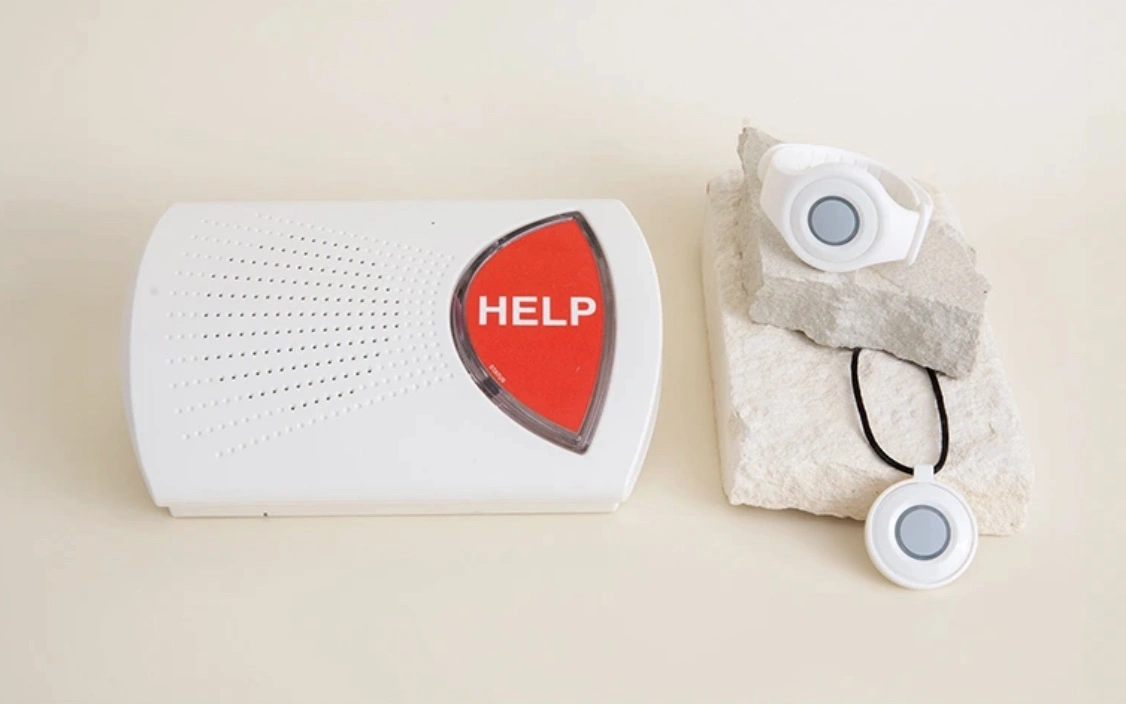
In-home base stations are usually the most budget-friendly option. They use a landline or cellular connection to contact a monitoring center and typically include a speaker and a wearable help button.
The button connects to the base unit, so its range matters. Walls, floors and multi-story layouts can affect coverage in bathrooms, basements, garages, and yards. Check the provider’s stated range and test the button throughout your home.
Mobile medical alert systems offer protection at home and on the go. Options include pendants, wristbands, smartwatches, and clip-on devices. Many use GPS location tracking and a cellular connection to contact a monitoring center outside the home.
Cellular Network vs. Landline Systems
Cellular medical alert systems use a wireless network to connect to a call center. Their coverage depends on the carrier network and signal strength in the areas where the wearable device is used. In-home systems can also use a landline connection, which relies on a wired telephone service.
Both connection types have limitations. Cellular signals may be weak inside some homes or outdoor areas, while landline service may be affected by outages. Some systems include backup batteries to maintain service during a power outage. Coverage and backup options vary by provider and device.
Monitored vs. Unmonitored Systems
Monitored systems connect to a 24/7 monitoring center, where trained operators respond to alerts and can contact medical emergency services. They may be a better choice for people whose family members or caregivers can’t always respond.
Unmonitored systems don’t connect directly to a monitoring center. Instead, they may call pre-set emergency contacts, such as family members, caregivers, or neighbors. These systems often cost less, and some have no monthly fees.
Before choosing, consider whether your emergency contacts can respond at night, during work hours and on holidays. Ask what happens if you can’t speak or no one answers. The response process depends on the system, so check how each provider handles unanswered alerts.
Choosing the Best Medical Alert System For Your Needs
Consider your health, lifestyle, and daily routine when choosing a personal emergency response system.
- Lifestyle and independence: If you spend most of your time at home, an in-home system may suit you. If you regularly leave home, consider a mobile system with GPS tracking.
- Risk of falling and mobility: If you’ve fallen before, have osteoporosis, or face mobility challenges, consider automatic fall detection alongside a manual help button. It can miss falls or trigger false alarms, so check how it works and whether it costs extra.
- Recovery and health needs: If you’re recovering from surgery or managing a health condition, look for easy-to-use controls, reliable two-way communication, and a help button you can reach when needed.
- Memory issues and wandering risk: If you or an older adult you know experiences memory issues or wandering, consider a mobile system with GPS tracking and caregiver location alerts.
- Monitoring preference: Decide whether you want a trained operator to respond to alerts or a system that contacts family members directly. Unmonitored systems rely on your emergency contacts being available.
- Budget: Compare the total cost of in-home, smartphone and combined systems, including equipment, activation fee, monitoring, and optional features. Check whether equipment is included or sold separately.
- Key features and comfort: Choose a device you can comfortably wear and operate. Check water resistance, battery life, charging needs, and low-battery alerts. For in-home systems, check for a backup battery.
- Monitoring center quality and response time: Check operator training, language support and average response times. Ask what happens if you can’t speak or your emergency contacts don’t answer and whether backup monitoring centers are available.
Medical Alert Companies Compared
| Company | In-Home starting price | Mobile starting price | Fall detection feature | Contract terms |
|---|---|---|---|---|
| MobileHelp | $29.95/month | $37.95/month | Optional; confirm price | No long-term contract |
| Medical Guardian | $34.95/month | $39.95/month | Optional; confirm price | No long-term contract |
| Bay Alarm Medical | $27.95/month (landline); $34.95/month (cellular) | $34.95/month | From $10/month; some devices require a $30 fee | No long-term contract |
| Life Alert | Call for pricing | Call for pricing | Confirm with provider | Confirm directly with provider |
| Lifeline | $34.95/month | $39.95/month | Optional; confirm price | No long-term contract |
For a closer look at our top picks, read our guide to the best medical alert systems, including their features, pricing and overall value.
Questions to Ask Before Buying a Medical Alert System
Before choosing a provider, ask these questions to compare monitoring services, costs and contract terms.
- Does the plan require a long-term contract? Check the minimum term and cancellation policy.
- Are there any hidden fees? Ask about activation, shipping, equipment, replacement, and cancellation fees.
- Is there a trial period? Check the refund terms if the system doesn’t meet your needs.
- Who receives an emergency alert first? Ask whether operators contact emergency contacts or dispatch emergency services.
- Can operators access your medical profile? Check whether they can share relevant health information with first responders.
- What happens if your device is lost or damaged? Ask about replacement costs and repair options.
How to Get An Affordable Medical Alert System
Original Medicare (Parts A and B) usually doesn’t cover medical alert systems. However, some Medicare Advantage, Medicaid, VA, and long-term care plans may offer coverage. You can also contact state programs and nonprofits, such as your local Area Agency on Aging, for financial assistance.
If you must pay out of pocket, ask providers about discounts, financing, and month-to-month plans. Compare the full cost, including equipment, activation, shipping, installation, and optional features. Check whether promotional rates increase after the initial period.
Before signing up, check whether a trial period is available and review its refund and return policy. Ask about cancellation fees, equipment-return requirements, and how to cancel your plan. Confirm when billing stops and consider a provider with no long-term contract and transparent pricing.
Medical Guardian

Great variety
Call chain for caregivers
Sleek, stylish wearable devices
ADT Medical Alert

Great plans
Home temperature monitoring
Fixed-rate service
How to Choose the Right Medical Alert Device
Here’s how different medical alert devices suit different needs and lifestyles.
- Help buttons: If you spend most of your time at home, an in-home system with a wearable help button offers a simple way to call for help. You can also consider wall-mounted buttons for easier access in specific areas.
- Bracelets and necklaces: If you want to wear your help button throughout the day, choose a bracelet or necklace that feels comfortable. Look for waterproof options if you also want protection while showering.
- Smartwatches: If you’re active and often leave home, a medical alert smartwatch may suit you. Look for features such as GPS tracking, two-way communication, and activity monitoring. Make sure you can operate and charge it easily.
Help us improve our guides! If you’ve recently chosen or used a medical alert system, we’d love to hear about your experience. Email us at [email protected]. Your personal details will remain completely confidential.